Instagram Account Locked? Immediate Steps to Regain Access
Encountering the message “Your Account Has Been Temporarily Locked” when attempting to log in to Instagram can be a frustrating experience. This notification, often accompanied by an explanation citing security measures, indicates that Instagram has restricted access to your account. Typically, the platform prompts you to verify your identity through a series of steps, usually involving a 6-digit security code sent to your registered email address. While receiving and entering this code usually resolves the issue, allowing you to regain access, many users find themselves locked out even after checking their email, as the security code is often not delivered.
Understanding Why Your Instagram Account Gets Locked
Account lockouts on social media platforms, including Instagram, are a common occurrence, frequently stemming from violations of platform policies. Instagram’s automated systems are designed to detect and respond to activities deemed suspicious or in breach of their guidelines by temporarily locking the account as a security precaution.
As a leading social media application, Instagram operates with clearly defined Community Guidelines to ensure a fair and secure environment for all users. Familiarizing yourself with these guidelines is crucial, as adherence to them is implicitly agreed upon when creating an account. Several common actions can trigger a temporary lock on your Instagram account:
-
Bot-like Activity: Engaging in activities at an unusually rapid pace, especially within short timeframes, can be flagged as bot-like behavior. This includes actions like excessively fast posting, liking or unliking numerous pictures in quick succession, or leaving a high volume of comments in a short period. Instagram’s algorithms are designed to identify and restrict such automated or inauthentic activity to maintain platform integrity and prevent spam or abuse.
-
Unauthorized Third-Party Apps: Instagram strictly prohibits the use of third-party applications that violate its terms of service. Many of these apps are designed to automate actions like follower acquisition, which is against Instagram’s policies. While some apps may have received platform approval, utilizing unapproved third-party software can lead to account restrictions.
-
Phishing and Account Hacking: Your account credentials may be compromised through phishing attempts, where deceptive websites mimicking Instagram’s login page are used to steal your information. If your account is accessed by unauthorized individuals who engage in policy violations, Instagram may temporarily lock your account as a protective measure.
Fortunately, there are steps you can take to unlock your Instagram account if it has been temporarily locked due to suspected unusual activity.
Steps to Unlock Your Temporarily Locked Instagram Account
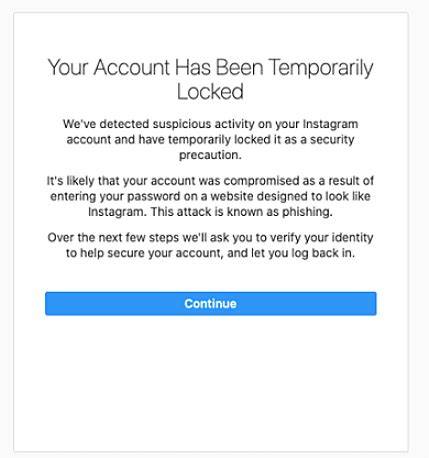
Before proceeding with account recovery, it is essential to thoroughly check your email’s spam or junk folder for the security code from Instagram. Email providers sometimes misclassify legitimate emails as spam, and the security code might inadvertently be placed there. Additionally, it is advisable to review your Instagram login activity through a PC or phone to identify any unauthorized access or suspicious actions that might have triggered the lock.
If you are unable to locate the security code in your email, it is crucial to avoid falling for scams that promise account recovery services. Numerous fraudulent online services claim to unlock Instagram accounts for a fee, but these are typically ineffective and can potentially compromise your account further. Refrain from sharing your Instagram login details or credit card information with any such websites.
Utilizing the “My Instagram Account Was Deactivated” Form
The primary and legitimate method to unlock your Instagram account is by completing the “My Instagram Account Was Deactivated” form, accessible within Instagram’s Help Center.
This form requires you to provide accurate details such as your Full name, Email address, Instagram Username, and Mobile number. In the form’s description section, clearly state that your account was mistakenly blocked and affirm that you have not violated any Instagram policies. After filling in all the required fields, click “Send” to submit the form.
It is important to select the correct form based on the specific reason for the account lock or deactivation. Instagram provides different forms for various situations, including:
- Deactivated by mistake (This is generally the most appropriate form for temporary locks due to suspicious activity).
- Disabled due to repeat intellectual property violations
- Disabled for not following Instagram’s Community Guidelines
- Account used to represent a business, product, or service
After submitting the form, anticipate an email response from Instagram. This response may request you to send a photograph of yourself holding a piece of paper displaying a specific code they provide. Ensure the paper is sufficiently large and clearly visible in the photo, similar to a placard. Instagram may reject submissions until they deem the photo satisfactory, so patience is essential and multiple attempts might be necessary to meet their requirements.
This photo verification process is designed to confirm your identity as a genuine user and differentiate you from automated bots or fraudulent accounts. The submitted photo is reviewed by Instagram employees, not automated systems, to ensure authenticity.
Following successful photo verification, you will need to wait for a confirmation message indicating “Your account has been restored.” While some users receive this confirmation within 24 hours, unlocking their account promptly, the process can sometimes take several days or even weeks. If the verification process is unsuccessful, Instagram typically does not send a notification of failure.
Understanding the Duration of a Temporary Instagram Lock
Instagram may impose temporary blocks on accounts, displaying messages like “Your account has been locked” or “You’re temporarily blocked.” These temporary restrictions are usually short-lived, potentially lasting for a few hours for minor violations, or extending to 24 to 48 hours in other cases. The duration of the block is often influenced by the history of previous violations and the severity of the current infraction.
Repeated breaches of Instagram’s guidelines can lead to progressively longer ban durations. Therefore, avoiding bot-like behavior and adhering to platform policies is crucial to prevent account restrictions. While temporary blocks are time-limited, an Instagram account lock can also be indefinite, particularly if it is a result of more serious or repeated violations. In such cases, filling out the “My Instagram Account Was Deactivated” form remains the primary path to attempt account recovery.
Contacting Instagram for Account Unlock Assistance
Yes, you can seek assistance from Instagram support through their Help Center page for various account-related issues. If you are experiencing login problems due to incorrect credentials or email issues, or if your account has been hacked or locked, the Help Center provides resources and contact options. You can also utilize the Help Center if you encounter problems posting content or face other account-related difficulties.
Recovering a Hacked Instagram Account
If you suspect your Instagram account has been compromised, immediately visit instagram.com/hacked/. This dedicated page provides a guided process to report and recover your hacked account. Follow the instructions and provide the requested details to initiate the account recovery process.
The Impact of Reports on Account Blocking
It is a common misconception that a specific number of reports will automatically lead to an Instagram account being blocked. While user reports are valuable for highlighting potential violations, Instagram does not solely rely on report volume to take action. Instead, Instagram evaluates accounts based on the number and severity of policy violations.
Observing that a reported account remains active can be frustrating. However, Instagram’s enforcement decisions are based on a comprehensive assessment of policy breaches. Serious violations, such as sharing explicit sexual content or illegal material, are likely to result in faster account disablement compared to less severe infractions.
We hope this guide helps you understand the reasons behind Instagram account locks and provides clear steps to regain access. Have you ever experienced your Instagram account being locked? What steps did you take to resolve it? Share your experiences and tips in the comments below!
Post a Comment