Master Your Music Library: Edit Audio Metadata & Tags on Windows with MP3tag
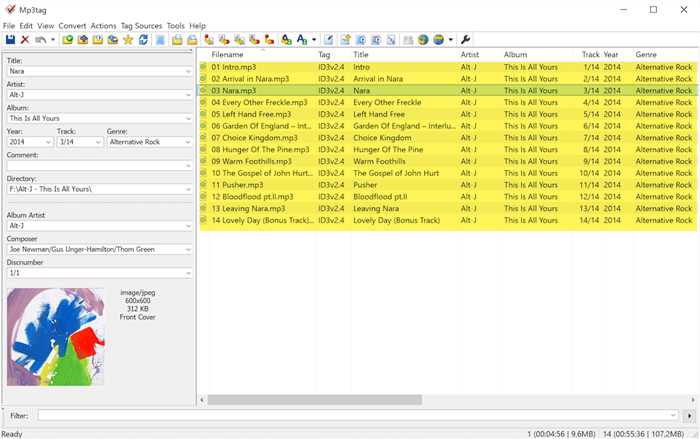
Managing a digital music library can sometimes be a frustrating experience, especially when you encounter audio files lacking proper tags or cover art. This can lead to a disorganized and visually unappealing music collection, where track details are displayed incorrectly or not at all on your audio devices. Fortunately, MP3tag emerges as a powerful and free universal tag editor for Windows, designed to empower you to take control of your audio metadata and artwork. This versatile tool supports a wide array of common audio formats and is compatible with various tagging standards, including ID3v1, ID3v2.3, ID3v2.4, iTunes MP4, WMA, Vorbis Comments, and APE Tags.
Unleashing the Power of MP3tag: Your Free Metadata Editor for PC
MP3tag provides a user-friendly interface that simplifies the process of editing audio file metadata. To begin your journey towards a well-organized music library, the first step is to specify the directory containing your audio tracks. MP3tag offers the convenience of selecting a default directory, ensuring that your preferred music folder is automatically loaded each time you launch the application. Once your tracklist is populated within the program, you can effortlessly navigate and select the specific track you wish to modify.
Upon selecting a track, the left-hand menu in MP3tag reveals a series of blank fields awaiting your input. These fields correspond to essential metadata categories, such as Title, Artist, Album, Year, Genre, Track number, Comments, Album Artist, and Composer. Populating these fields with accurate and comprehensive details significantly enhances the organization and searchability of your music library. After entering the desired information, simply click the save icon located on the top toolbar to commit your changes.
MP3tag distinguishes itself through its intuitive design and efficient workflow. As you become more familiar with the program’s functionalities, you will discover its capability to perform batch metadata editing across multiple files simultaneously. This feature is particularly valuable for users with extensive music libraries, saving considerable time and effort in maintaining consistent and accurate tagging.
Conversion Features: Transforming Tagging Efficiency
Beyond basic metadata editing, MP3tag incorporates powerful conversion features that further streamline the process of managing your music library. These features enable you to dynamically rename files based on tag information or, conversely, populate tag information directly from filenames. These functionalities prove especially useful when dealing with files that are improperly named or possess inaccurate tag data. MP3tag offers five distinct conversion modes to cater to various tagging scenarios:
-
Tag-Filename: This mode empowers you to rename audio files based on existing tag information. For example, you can automatically rename files to follow a consistent naming convention like “Artist - Title.mp3” using the data already present in the tags.
-
Filename-Tag: Reversing the previous mode, Filename-Tag allows you to extract tag information directly from the filename. This is incredibly useful when you have files named in a structured way (e.g., “Artist - Album - Title.mp3”) and want to populate the corresponding tag fields automatically.
-
Filename-Filename: Functioning as a versatile renaming tool, this mode lets you modify existing filenames according to your preferred format. You can use placeholders to rearrange parts of the filename or add new elements, providing granular control over file naming conventions.
-
Text File-Tag: This mode facilitates the import of tag information from an external text file. This is particularly helpful when you have metadata details stored in a structured text file (like a CSV or TXT file) and want to apply it to your audio files in bulk.
-
Tag-Tag: This advanced mode allows you to derive tag information from existing tags. For instance, you could use this mode to copy the “Artist” tag to the “Album Artist” tag for a selected group of tracks, ensuring consistency across your library.
Mastering these conversion modes involves understanding and creating strings based on specific rules and formats. However, MP3tag simplifies this process with clear instructions and examples, making it accessible even to users who are not technically proficient.
Online Metadata Retrieval: Accuracy at Your Fingertips
MP3tag further enhances its utility by incorporating built-in capabilities for fetching metadata from online databases. This invaluable feature significantly reduces manual data entry and ensures accuracy in your tag information. By leveraging online resources, MP3tag can automatically retrieve album art, track titles, artist names, and other relevant metadata, saving you considerable time and effort while ensuring the completeness and correctness of your music library’s information.
Why MP3tag is an Essential Tool for Music Lovers and Professionals
MP3tag stands out as an exceptional tool for anyone who values a well-organized and meticulously tagged music library. Its intuitive interface, coupled with its powerful features, makes it accessible to both casual music enthusiasts and seasoned professionals in the music industry. The conversion features alone offer a significant advantage in managing large music collections efficiently. Furthermore, the integrated web search capabilities for metadata retrieval elevate MP3tag beyond a simple tag editor, transforming it into a comprehensive music library management solution.
Whether you are a singer, composer, DJ, music producer, or simply an avid music listener seeking to organize your personal collection, MP3tag is an indispensable freeware tool. Its ability to streamline metadata editing and ensure accurate tagging contributes to a more enjoyable and efficient music listening experience.
Downloading MP3tag: Start Organizing Your Music Today
Ready to take control of your music library? Download MP3tag for Windows 11/10 by clicking here.
Exploring Alternatives: Grantman MP3 Tagger
While MP3tag is a highly recommended tag editor, it’s worth mentioning Grantman MP3 Tagger as another noteworthy alternative. Grantman MP3 Tagger is also designed with simplicity and power in mind, offering an intuitive platform for editing ID3 tags. It allows users to effortlessly modify song information, including title, artist, album, genre, track number, year, lyrics, and comments. Moreover, it supports embedding album art into your audio files, enhancing the visual appeal of your music library.
Grantman MP3 Tagger distinguishes itself with its “Lookup Tags” feature. This function searches online music databases to automatically retrieve information about a song and its corresponding album art. This capability simplifies the tagging process, especially for users who want to quickly and accurately tag large numbers of files.
While both MP3tag and Grantman MP3 Tagger offer robust tag editing capabilities, the best choice ultimately depends on individual preferences and specific needs. Exploring both tools can help you determine which one aligns best with your workflow and music library management style.
Take control of your music library today and enjoy a more organized and enriching listening experience! What are your favorite features in MP3tag or other tag editors? Share your thoughts and experiences in the comments below!
Post a Comment